
Tampilkan postingan dengan label Desktop. Tampilkan semua postingan
Tampilkan postingan dengan label Desktop. Tampilkan semua postingan
25.2.12

12.12.11
Rainmeter
Rainmeter adalah sebuah software untuk memudahkan kita untuk melihat memory, RSS feeds atau ramalan cuaca. Software ini menggunakan koneksi internet, seperti ramalan cuaca, dan tanpa internet pun kita bisa menjalankannya.


Rainmeter displays customizable skins, like memory and battery power, RSS feeds and weather forecasts, right on your desktop. Many skins are even functional: they can record your notes and to-do lists, launch your favorite applications, and control your media player - all in a clean, unobtrusive interface that you can rearrange and customize to your liking. Rainmeter is at once an application and a toolkit. You are only limited by your imagination and creativity.
Rainmeter is open source software distributed free of charge under the terms of the GNU GPL v2 license.
Supported:
32bit and 64bit versions of Windows XP (SP2+), Vista, 7, and 8.
Rainmeter dibagikan gratis, dan jika sobat ingin mengganti skin bisa di download di http://rainmeter.net/cms/Discover
Atau bisa berkunjung ke DeviantArt.com/Rainmeter
Semoga bermanfaat.
Rainmeter
Password : blog.try.pw
Screenshoot

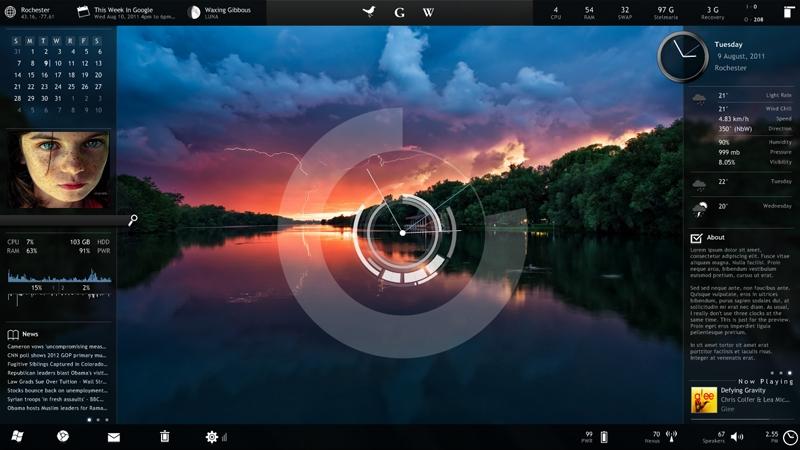
Rainmeter displays customizable skins, like memory and battery power, RSS feeds and weather forecasts, right on your desktop. Many skins are even functional: they can record your notes and to-do lists, launch your favorite applications, and control your media player - all in a clean, unobtrusive interface that you can rearrange and customize to your liking. Rainmeter is at once an application and a toolkit. You are only limited by your imagination and creativity.
Rainmeter is open source software distributed free of charge under the terms of the GNU GPL v2 license.
Supported:
32bit and 64bit versions of Windows XP (SP2+), Vista, 7, and 8.
Rainmeter dibagikan gratis, dan jika sobat ingin mengganti skin bisa di download di http://rainmeter.net/cms/Discover
Atau bisa berkunjung ke DeviantArt.com/Rainmeter
Semoga bermanfaat.
Rainmeter
Password : blog.try.pw

25.9.11
RocketDock v1.3.5
RocketDock adalah sebuah software launcher pengganti shortcut yang ada di desktop. RocketDock pun diberikan secara gratis oleh pembuatnya.
Screenshot

RocketDock is a smoothly animated, alpha blended application launcher. It provides a nice clean interface to drop shortcuts on for easy access and organization. With each item completely customizable there is no end to what you can add and launch from the dock.
Now with added Taskbar support your minimized windows can appear as icons on the dock. This allows for better productivity and accessibility.
Features:
- Minimize windows to the dock
- Real-time window previews in Vista
- Running application indicators
- Simple drag-n-drop interface
- Multi-monitor support
- Supports alpha-blended PNG and ICO icons
- Icons zoom and transition smoothly
- Auto-hide and Popup on mouse over
- Positioning and layering options
- Fully customizable
- Completely Portable
- ObjectDock Docklet support
- Compatible with MobyDock, ObjectDock, RK Launcher, and Y'z Dock skins
- Runs great on slower computers
- Unicode compliant
- Supports many languages and can easily be translated
- A friendly user base :)
- And best of all... its FREE!!!
Windows 2000/XP/Vista/7
500Mhz or faster CPU
10MB RAM free
Untuk menambah skin dan icon RocketDock kunjungi http://rocketdock.com/addons/
Info : http://rocketdock.com/
Selamat mencoba.
RocketDock v1.3.5
Password : blog.try.pw
19.7.11
Windows Sidebar Gadget

15.7.11
Winstep Xtreme 11.6 build 979
Winstep Xtreme adalah sebuah software untuk mempercantik tampilan Desktop dan software ini mempunyai tampilan 3D yang lebih elegan. Winstep Xtreme 11.6 yang saya dapatkan ini sudah full cracked, sobat hanya tinggal menginstall saja.


New Feature :
System Requirements:
Windows 2000/2003 Server/XP/Vista/7
32 or 64 bit.
500 Mhz processor.
256 MB of RAM.
50 MB of free hard disk space.
Screen resolution 800x600 or higher
Sobat hanya perlu mendownload, extract menggunakan winrar lalu install. Winstep Xtreme 11.6 sudah full cracked, support beberapa bahasa dan didalamnya juga sudah terdapat beberapa tema pilihan. Jika sobat menginginkan tema lain kunjungi http://www.wincustomize.com/explore/winstep.
Semoga bermanfaat.
Winstep Xtreme 11.6
Password : blog.try.pw


New Feature :
- Added 'Show this dock when the mouse pointer bumps screen edge' setting to the Behavior tab of the Dock Properties dialog. When this setting is on, the dock will come forward when the associated edge is bumped but focus will be automatically given back to the window that previously had it if the user mouses away without clicking on it.
- Dock resizing and drag & drop of items into and from the dock is now much smoother.
- Added 'Disable/Enable Auto-Hide' option to the Shelf's left mini-tab context menu.
- Cleaned up unused bitmaps in the resource file.
- Context menus now use the menu sub-theme, if available, rather than the primary theme.
- The Shelf now automatically selects appropriate tab position (top or bottom of the Shelf) when you dock it to the top or the bottom of the screen.
System Requirements:
Windows 2000/2003 Server/XP/Vista/7
32 or 64 bit.
500 Mhz processor.
256 MB of RAM.
50 MB of free hard disk space.
Screen resolution 800x600 or higher
Sobat hanya perlu mendownload, extract menggunakan winrar lalu install. Winstep Xtreme 11.6 sudah full cracked, support beberapa bahasa dan didalamnya juga sudah terdapat beberapa tema pilihan. Jika sobat menginginkan tema lain kunjungi http://www.wincustomize.com/explore/winstep.
Semoga bermanfaat.
Winstep Xtreme 11.6
Password : blog.try.pw


